The new KSR (Karaoke Singer Request) web-app is now available and free for DEX 3 and LYRX owners. The KSR system allows you to easily host your karaoke songbook online (note: currently supports up to 100,000 songs), allowing your karaoke singers to browse and search your karaoke catalog and make song requests that you accept right inside the DEX 3/LYRX singer rotation list. Since it’s a web-app, any internet enabled device will work, such as the singers mobile phone, a tablet or laptop.
Leave the physical songbook at home and forget printing out hundreds of pages every time you update your karaoke music library. Simply enable the KSR service in options, sync your songbook, get assigned your unique KSR ID, and your singers are ready to start sending in karaoke song requests. It’s that easy!
How KSR Works
Setting up and using KSR with DEX 3 or LYRX takes no time at all. Just enable the KSR service in options, register your venue, add the karaoke songs you wish to share with your singers to the new dedicated “Karaoke Catalog” special list in DEX 3 or LYRX and upload. You’ll then be assigned a unique ID to share with your singers. Have them visit the ksr.pcdj.com website from their mobile device, punch in your unique ID — and they’re ready to view, search, and make requests that pop up in DEX 3’s/LYRX’s rotation list. Singers can even create their own “Favorites” list within the KSR web-app.
Scroll down for step-by-step instructions on how to get started with KRS and online songbooks today!
How to Setup & Use the KSR (Karaoke Singer Request) System
Step 1
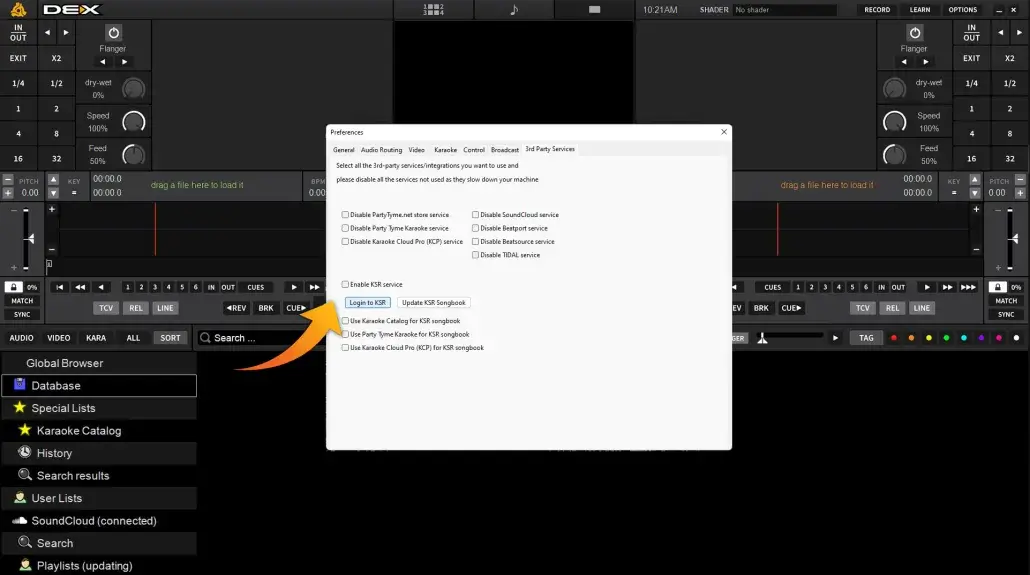
Open up DEX 3 (or LYRX) and click the Options button. Under the “3rd-Party Services” tab, first tick the box to enabled KSR and then click the “Login to KSR” button.
Step 2
Click on the “Register / Sign Up” Option.
Step 3
Create your account and click “Register”.
Step 4
Click on “Authorize”.
Step 5
Select the karaoke song lists you wish to share with your singers (Karaoke Catalog for your own music (we’ll explain more below) and Party Tyme Subscription or Karaoke Cloud Pro if you’re a subscriber). You will be prompted to restart after each selection, but wait until each box is checked first.
Step 6
Restart DEX 3/LYRX.
Step 7
Add your own karaoke music to the “Karaoke Catalog” special list (located under Special Lists). You can select all your karaoke songs and drag/drop to the list to populate it, or only the karaoke songs you wish to share with singers (currently capped at 100,000 total songs).
Step 8
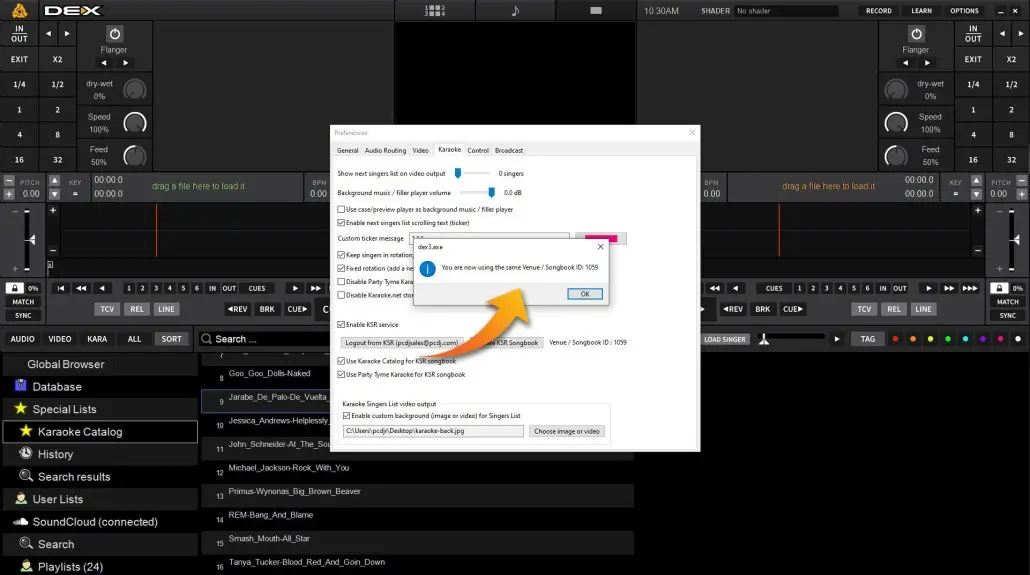
Go into DEX 3’s options and under the “Karaoke” tab click the “Update KSR Songbook” button to sync your list of karaoke music. You will be asked to add a venue/songbook name. Create a unique name and click “OK”.
Step 9
You will be assigned a unique venue ID. It’s this ID number you share with your singers. Singer will need to go to ksr.pcdj.com and create a free account. They will then be prompted for your venue ID. Once they apply the ID they can view, search, and make request from your online karaoke song book.
Final Step
When a singer submits a song request you will be notified in the DEX 3/LYRX singer rotation list. Click “Accept” to accept the request and the singer/song will be submitted into rotation. That’s it!
The screenshots displayed above are of the ‘ KSR web app’ that your karaoke singers will use to access your online karaoke songbook and submit song requests. They simply need to visit ksr.pcdj.com and create a free account, type in your songbook ID, and they’re ready to browse, search, and send in requests. They also add songs to their own personal ‘Favorites” folder within the web app. Why a web app? No need for your singers to install iOS or Android apps — any web enabled device will work!
System Requirements
DEX 3.16 or higher LYRX 1.7 or higher (The cap is currently set to 100,000 total songs – this may change in the future!)